
Scan first, order second
In China, the menu rarely comes to you. At most restaurants, coffee shops, fast food chains, and bubble tea places, you'll see a QR code on the table or at the counter. You scan it with WeChat, and it opens a mini program, a lightweight app that runs inside WeChat itself. From there you browse the menu, choose your options, and pay, all without speaking a word.
It sounds simple. It is, once you know what you're looking at. The challenge is that everything is in Chinese characters. There's no English fallback, no auto-translate button. But with a handful of key characters and the help of the pictures, you can get surprisingly far.
If you're completely stuck on a character, try Dear Translate, a camera translation app that works reliably in China. Point it at the text and it translates on screen. That said, knowing even a few characters yourself is much faster, and a lot more satisfying.
A bubble tea order: Nayuki 奈雪
Nayuki (奈雪的茶) is one of China's most popular premium tea chains. Their mini program is a good example of what ordering looks like in practice. You choose your drink, then work through a series of options before adding to cart.
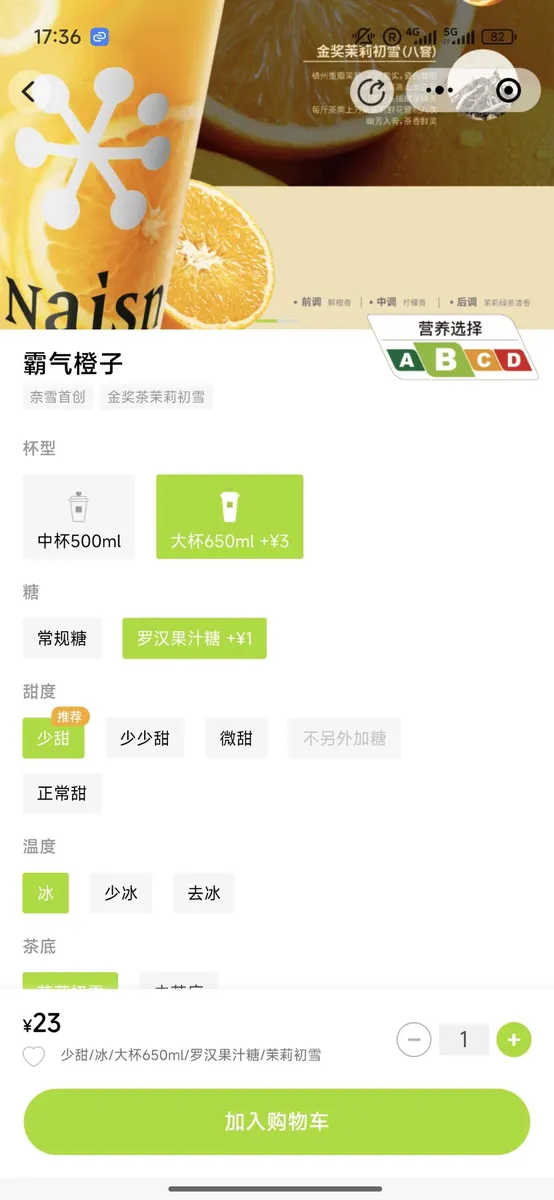
A Nayuki order screen: the orange drink at the top is 霸气橙子 (bàqì chéngzi), "bold orange"
Below the product image you'll see a series of option categories. This is the standard layout across almost every ordering app in China:
| 杯型 | bēi xíng | Cup size |
| 中杯 | zhōng bēi | Medium cup |
| 大杯 | dà bēi | Large cup |
| 糖 | táng | Sugar |
| 甜度 | tián dù | Sweetness level |
| 少甜 | shǎo tián | Less sweet |
| 微甜 | wēi tián | Slightly sweet |
| 正常甜 | zhèngcháng tián | Normal sweet |
| 温度 | wēn dù | Temperature |
| 冰 | bīng | Ice / cold |
| 少冰 | shǎo bīng | Less ice |
| 去冰 | qù bīng | No ice |
| 热 | rè | Hot |
| 加入购物车 | jiārù gòuwùchē | Add to cart |
Notice that the recommended option (推荐, tuījiàn) is usually highlighted in green or orange. You don't need to read everything. Just look for the highlighted button and work from there. The price at the bottom (¥23 in this case) updates automatically as you make selections.
Fast food: KFC in China
KFC (肯德基, Kěndéjī) is everywhere in China and a great place to practice ordering via app, because the pictures are large and the menu is structured in a familiar way. You scan the QR code at the counter, or use the Meituan app if you want to pick up or order ahead.
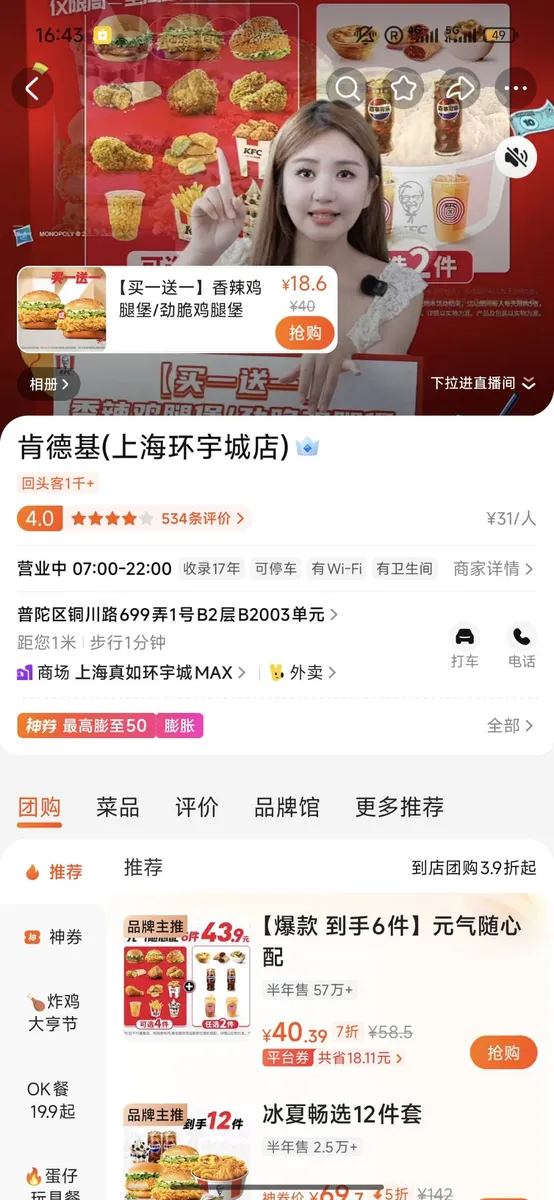
The restaurant page on Dianping (大众点评), China's version of TripAdvisor. Notice the live video stream at the top: restaurants often broadcast real-time footage and a service agent you can chat with directly to ask questions before you visit or order.
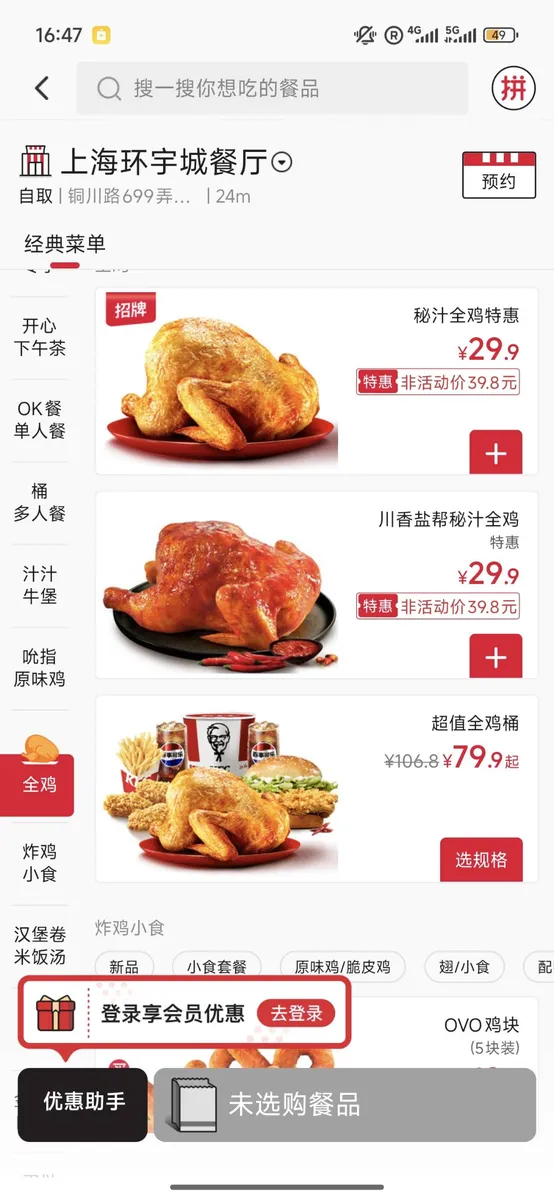
The 经典菜单 (classic menu) section showing 全鸡 (whole chicken) options
On the restaurant overview page you'll see useful information even before you start ordering:
| 营业中 | yíngyè zhōng | Currently open |
| 自取 | zì qǔ | Collect yourself (takeaway) |
| 外卖 | wàimài | Delivery |
| 经典菜单 | jīngdiǎn càidān | Classic menu |
| 招牌 | zhāopai | Signature dish |
| 新品 | xīn pǐn | New item |
| 特惠 | tè huì | Special offer / deal |
| 选规格 | xuǎn guīgé | Choose options |
| 预约 | yùyuē | Reserve / book |
The menu is divided into categories on the left side: 开心下午茶 (afternoon tea), OK餐 (value meals), 桶多人餐 (bucket meals), and so on. You don't need to read every category. Just scroll through the pictures and tap on what looks good. Then you'll see the same size/temperature options as on the tea app.
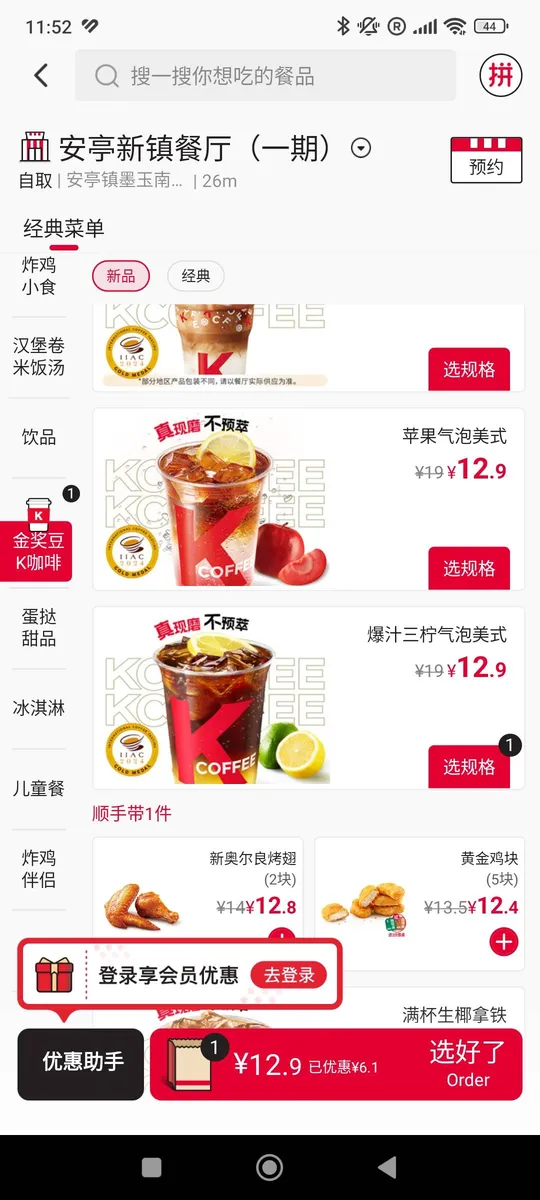
KFC's coffee brand K Coffee: 饮品 (yǐnpǐn) means "drinks"
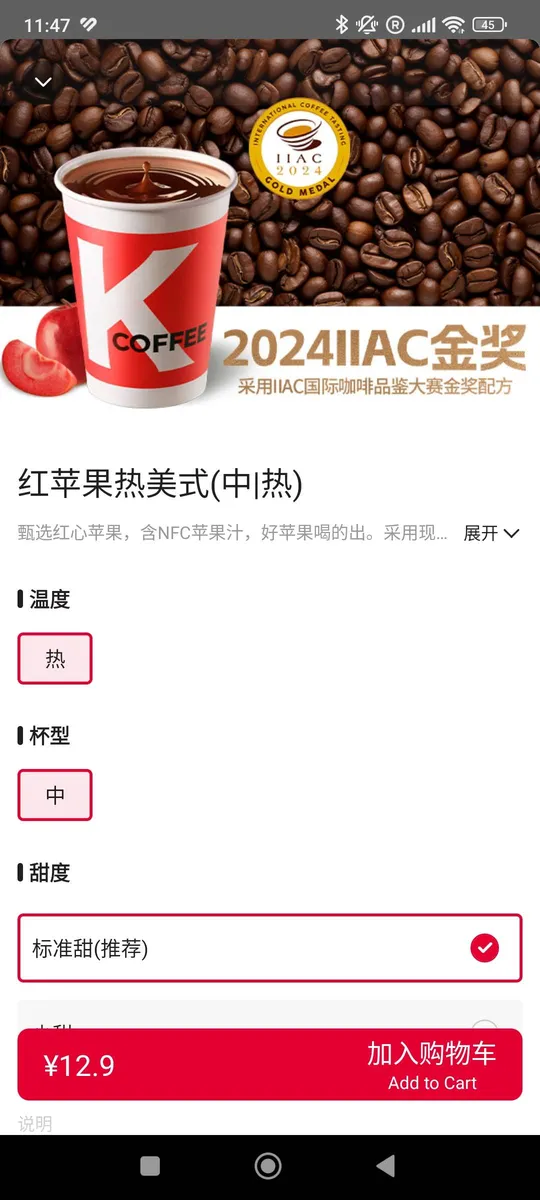
选规格: choosing your options: 温度 (temperature), 杯型 (cup size), 甜度 (sweetness)
| 饮品 | yǐnpǐn | Drinks |
| 热 | rè | Hot |
| 冷 | lěng | Cold |
| 中 | zhōng | Medium |
| 大 | dà | Large |
| 标准甜 | biāozhǔn tián | Standard sweet (recommended) |
| 推荐 | tuījiàn | Recommended |
Small restaurants: reading a real menu board
Not every place uses an app. Small local restaurants, especially breakfast spots, still have physical menu boards on the wall. These are often the most interesting places to eat, and the most rewarding to navigate.
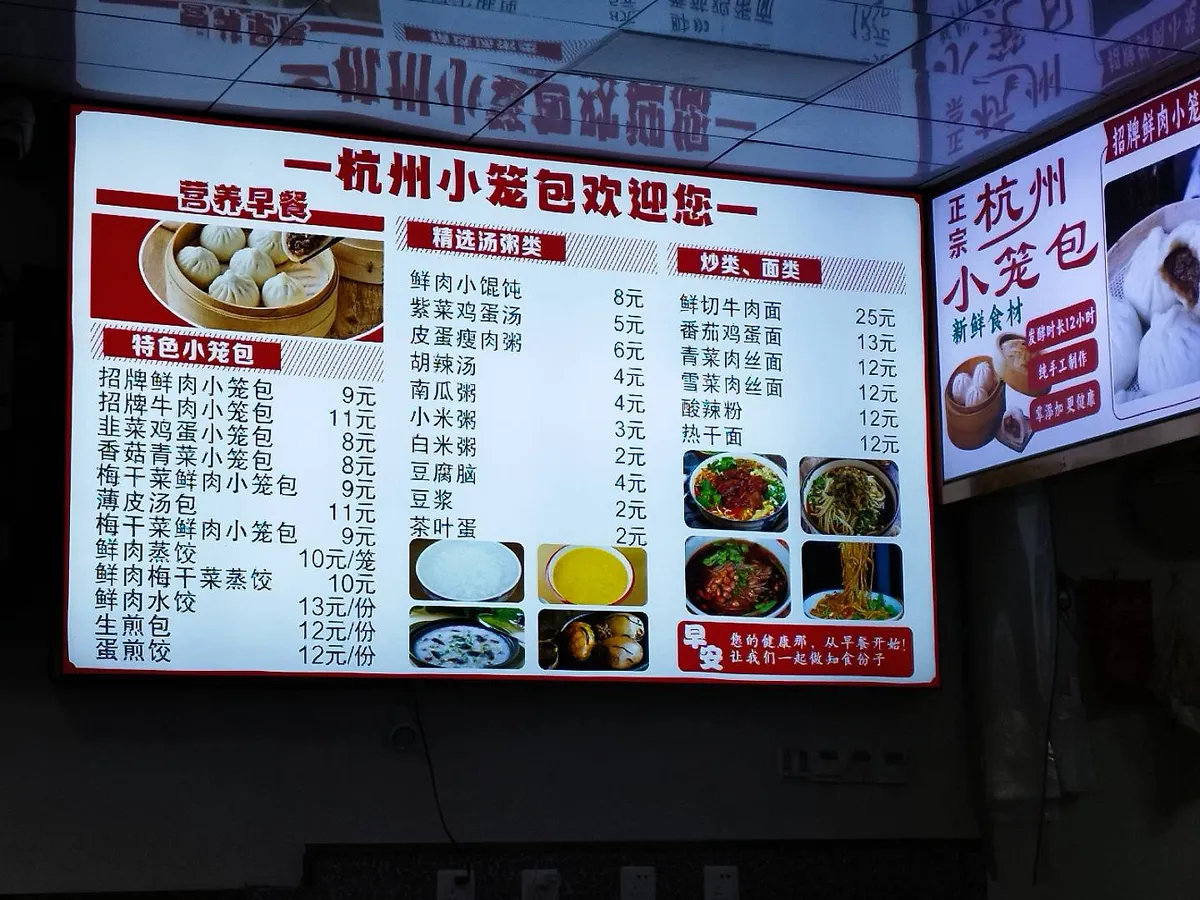
A menu board at a 杭州小笼包 (Hangzhou xiaolongbao) restaurant: steamed dumplings, porridge and noodles
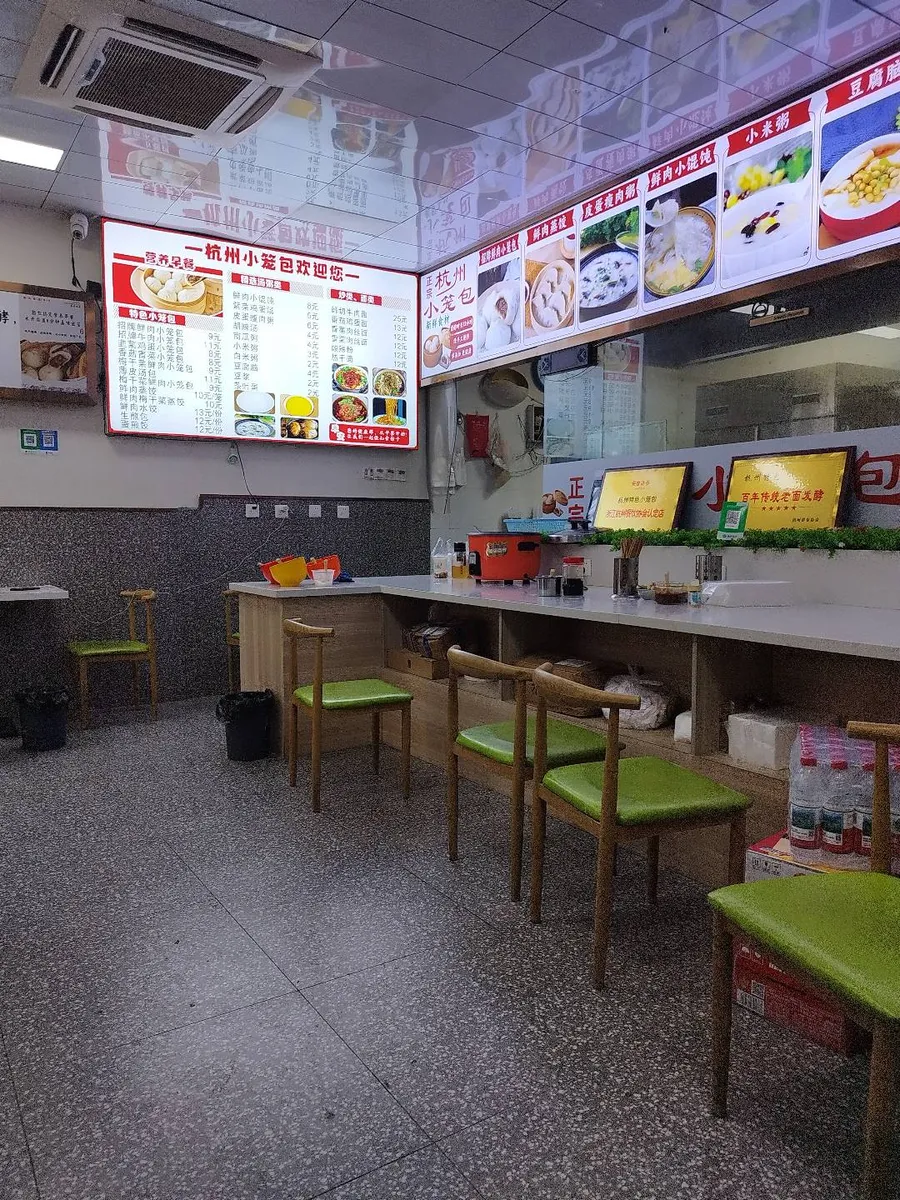
The interior: order at the counter, find a seat, and your food arrives
This kind of menu looks complicated at first but actually has a very logical structure. The dishes are grouped by type, and the price is always written as a number followed by 元 (yuán) or just ¥. You don't need to read the whole menu. Focus on the category headings and a few key characters.
| 小笼包 | xiǎolóng bāo | Steamed soup dumplings |
| 鲜肉 | xiān ròu | Fresh meat (pork) |
| 牛肉 | niú ròu | Beef |
| 鸡蛋 | jī dàn | Egg |
| 蔬菜 | shūcài | Vegetables |
| 汤 | tāng | Soup |
| 粥 | zhōu | Congee / rice porridge |
| 面 | miàn | Noodles |
| 饺子 | jiǎozi | Dumplings (boiled) |
| 元 / ¥ | yuán | Chinese yuan (price) |
| 份 | fèn | Portion / serving |
| 笼 | lóng | Steamer basket (measure word for xiaolongbao) |
One more example: a local restaurant app
This is from a small chain restaurant in Shanghai called Longtang Flavor (弄堂咪道). You scan the QR code at the table, and the app shows you exactly what's available, with photos and prices. The categories on the left guide you through the menu, and each dish name tells you the key ingredient.
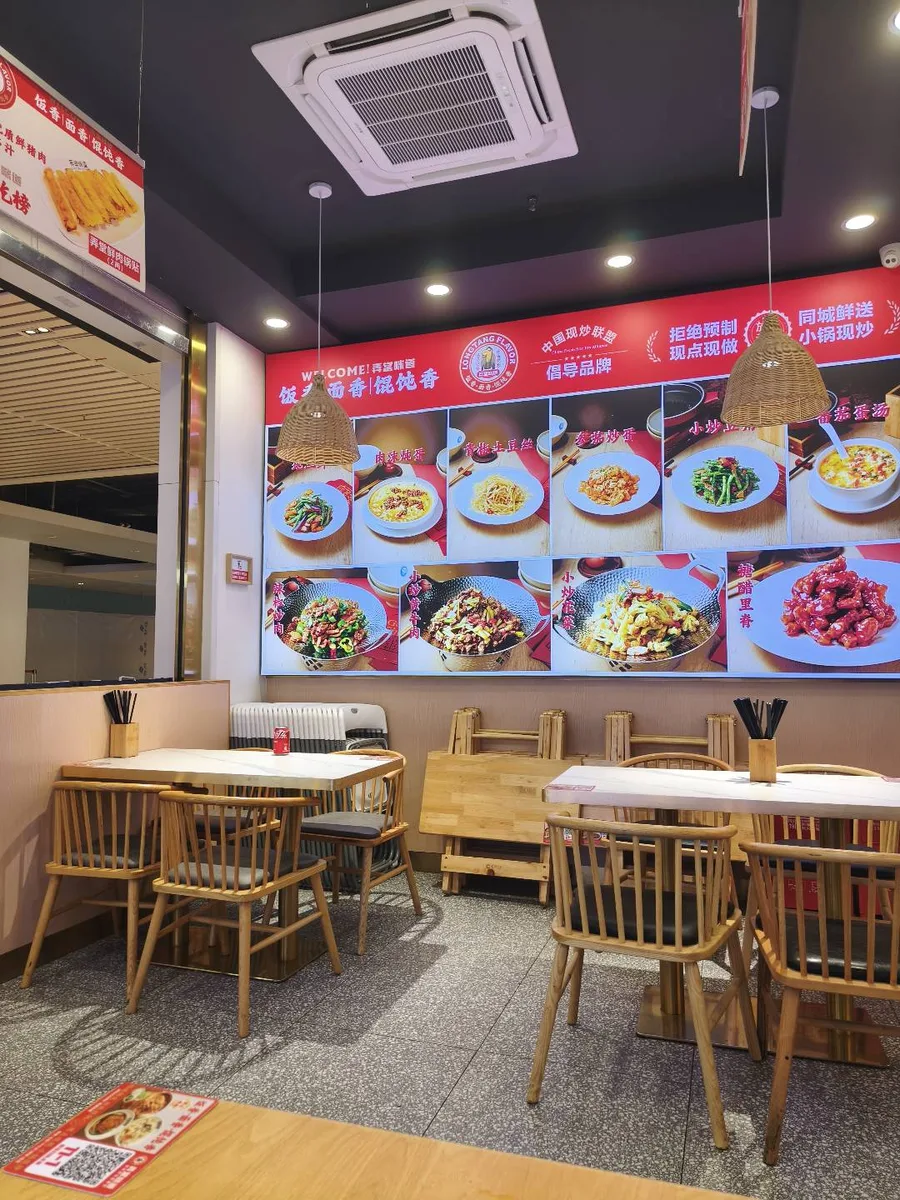
The restaurant itself: a digital wall menu shows all dishes with photos and Chinese names
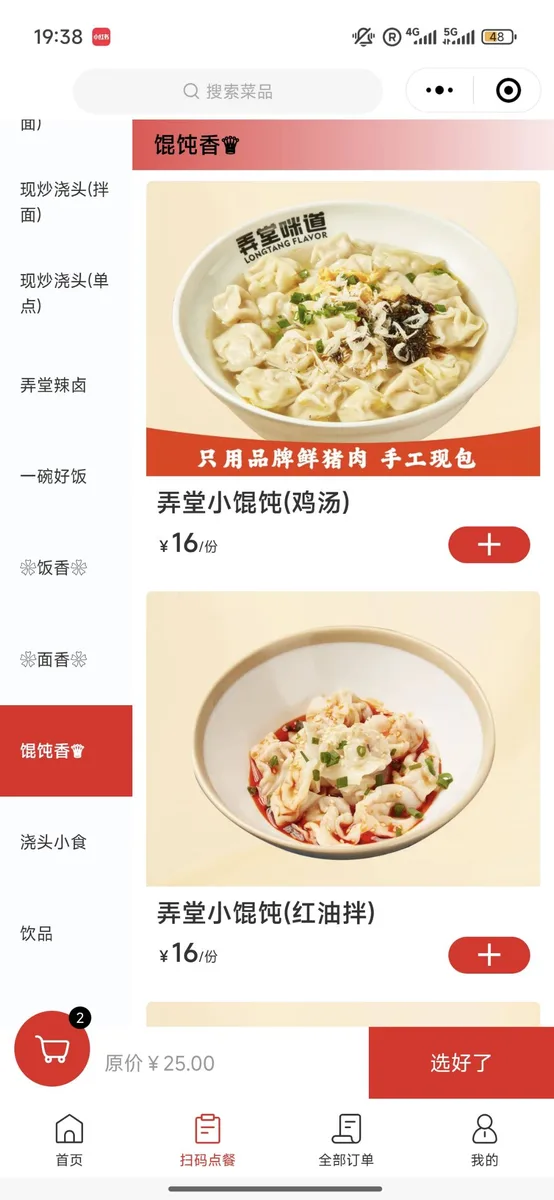
馄饨香 (húntun xiāng): the wonton section. 鸡汤 = chicken soup, 红油拌 = chili oil. Both ¥16 per serving (份, fèn)
| 馄饨 | húntun | Wontons |
| 鸡汤 | jī tāng | Chicken soup |
| 红油 | hóng yóu | Chili oil |
| 现炒 | xiàn chǎo | Stir-fried to order (fresh, not pre-made) |
| 饮品 | yǐnpǐn | Drinks |
| 份 | fèn | Portion / serving |
| 扫码点餐 | sǎo mǎ diǎn cān | Scan QR code to order |
| 选好了 | xuǎn hǎo le | Done selecting / confirm order |
You don't need to read everything
One of the things our students find most surprising is how little you actually need to read to get by. On a drink order screen, if you recognize 冰 (ice) and 热 (hot), 大 (large) and 中 (medium), 少甜 (less sweet), you can place a perfectly good order.
On a restaurant menu, if you can spot 牛肉 (beef) or 鸡蛋 (egg) in a dish name, you already know the core ingredient. That's often enough to decide.
This is exactly the kind of practical character recognition we work on in our Mandarin for Travel and Conversational Chinese lessons. Not memorizing hundreds of characters in isolation, but learning the ones that actually show up in real life and understanding why they look the way they do.
A few sessions focused on food vocabulary and you'll find China's restaurants suddenly feel a lot more approachable.
When you're unsure about a dish, look for 招牌 (zhāopai, meaning "signature") or 推荐 (tuījiàn, meaning "recommended") next to an item. These are safe bets at any restaurant, and they're usually highlighted or boxed in a different color.